Home/Guides/JPG, PNG, WebP, or AVIF: which should you use?
JPG, PNG, WebP, or AVIF: which should you use?
The best image format is the one that keeps the detail you need and works where you’re sending it. A photo for an upload form, a transparent logo, and a website hero image have different requirements. Start with the destination, then compare file size and appearance.
A quick way to choose
| What you’re making | Start with | Why |
|---|---|---|
| A photo for an email or upload form | JPG | Broad compatibility and a useful balance of quality and size. |
| A transparent logo, screenshot, or cutout | PNG | Transparency and sharp edges, without JPG artifacts. |
| Photos or graphics for a website | WebP | Worth comparing for smaller files; supports transparency too. |
| Website images where you control delivery | AVIF | Can offer further savings, with a tradeoff in encoding time and compatibility. |
| An editable logo or simple illustration | SVG | Vector artwork stays sharp when resized. PicThin is for raster images, not SVG editing. |
If a form specifies a format, follow that rule. File size savings won’t help if the destination can’t open the result.
Lossy and lossless, in plain English
Lossless compression stores the encoded pixels without discarding information. Decode the file and you get those pixels back. Lossy compression trades some detail for a smaller file. At a suitable setting, the difference may be hard to notice; push it too far and you’ll see blur, blocks, or rough gradients.
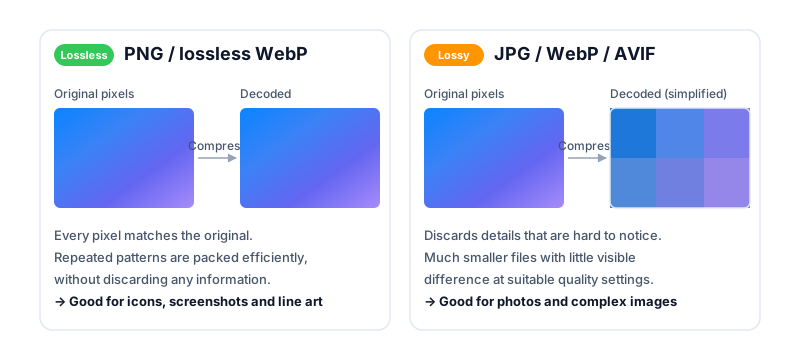
A tool can also change the pixels before saving them in a lossless format. For example, reducing a PNG’s color palette changes the image even though the final PNG encoding is lossless. “Still a PNG” doesn’t automatically mean “unchanged.”
JPG: a practical choice for photos
JPG, also called JPEG, works well with the smooth color changes and fine textures found in photos. Lower quality settings discard more detail to reduce the file size. It doesn’t support transparency, and sharp text or line art can show distracting artifacts.
Keep a high-quality original and make each compressed copy from it. Repeatedly editing and re-encoding a JPG can cause visible damage. If you’re trying to meet a limit, follow the JPG file size guide.
PNG: transparency and crisp graphics
PNG is useful for screenshots, logos, interface graphics, and images that need a transparent background. Its lossless encoding handles repeated patterns well. A detailed photo contains far more variation, so the same scene can be much larger as PNG than as JPG.
Use PNG compression when the file must remain a PNG. Check gradients and soft edges if you reduce the number of colors. For a design master that must retain every pixel, keep the original.
WebP: worth trying for the web
WebP supports both lossy and lossless compression, along with transparency. It can make a useful alternative to JPG for photos or PNG for web graphics. Compare actual files rather than assuming every WebP will be smaller.
A browser being able to display WebP doesn’t mean every upload form or desktop app accepts it. For a website you control, check your audience’s browser requirements. For a form you don’t control, follow its accepted file types. If needed, convert WebP to JPG.
AVIF: smaller files can take more work
AVIF can preserve useful detail at small file sizes, but encoding can take longer and support depends on the browser, app, and workflow. It’s worth testing for images you prepare once and serve many times.
On a website, you can use a <picture> element to offer AVIF first, then WebP or JPG as alternatives. Don’t assume that a browser’s ability to display AVIF also means it can encode an AVIF file. PicThin only offers output formats supported by your browser.
Compare the same scene
These files show the same landscape with different formats and settings. Open each preview and look at the grass, cliffs, and sky. Quality numbers are not equivalent across formats, so this is a practical comparison—not a controlled ranking of the codecs.
What about GIF?
GIF is often associated with short animations, but its limited color palette makes it a poor fit for detailed photos. Animation also needs its own workflow: converting to a still-image format won’t preserve motion. Don’t use PicThin as an animation editor.
Make the smallest file that still does the job
Choose a compatible format, keep an original, and inspect the result at the size people will actually see. For a thumbnail, a tiny file may be enough. For a document or product photo, readable text and useful detail matter more than winning a file size comparison.
Ready to try it? Open PicThin to compress or convert images in your browser. Your images stay on your device.